Which Notepad++ release file should I download?
Download npp.8.9.8.1.Installer.x64.exe for a normal Windows 10 or 11 PC. Take the ARM64 installer on a Windows on ARM laptop, the portable zip where you cannot install software, and the MSI only for managed deployment. The table lists every file the release contains.
| File name pattern | When to use it |
|---|---|
npp.<version>.Installer.x64.exe | 64-bit installer for Windows 10 and 11; the file winget installs on a normal PC. |
npp.<version>.Installer.arm64.exe | Installer for Windows on ARM laptops. |
npp.<version>.Installer.exe | 32-bit installer for old 32-bit Windows installations. |
npp.<version>.Installer.x64.msi | MSI for IT departments; the developer recommends the .exe for everyone else. |
npp.<version>.portable.x64.zip / .7z | Portable build with plugins and Plugins Admin; runs from any folder without administrator rights. |
npp.<version>.portable.minimalist.x64.7z | Mini-portable build: default themes and English only, no plugins or Plugins Admin. |
<file>.sig | GPG signature for the file with the same name. |
npp.<version>.checksums.sha256 | SHA-256 digest of every package in the release, with its own .sig. |
Package descriptions follow the user manual's getting-started page.
How do I confirm a release file is genuine?
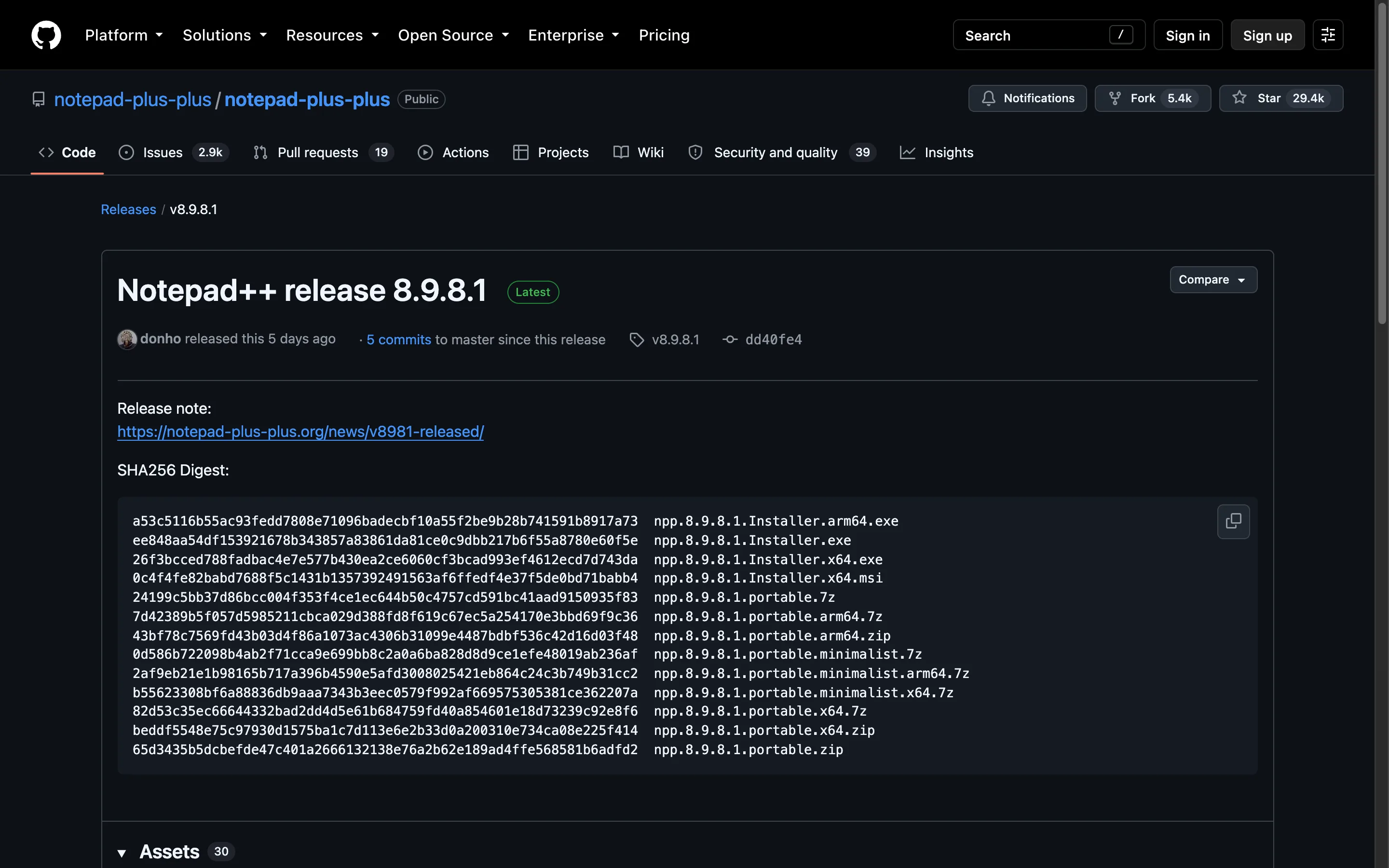
Compare the file's SHA-256 with the digest on the GitHub release, and for extra certainty check its GPG signature with the Notepad++ release key. Both take under a minute.
- Open the release on
github.com/notepad-plus-plus/notepad-plus-plus/releases; the release body lists a SHA-256 digest for each package. - In PowerShell, run
Get-FileHash .\npp.8.9.8.1.Installer.x64.exe -Algorithm SHA256and compare the output with that digest, ignoring upper or lower case. - For the signature, download the matching
.sigfile and verify it with GPG against key0x8D84F46E, whose fingerprint is published in the project README.
winget does the hash check for you: it compares the downloaded installer with the SHA-256 in the Notepad++ manifest and refuses to run it if they differ. The one-line install is the least error-prone route.
What do the Notepad++ release notes cover?
Every version has a page on notepad-plus-plus.org that lists vulnerability fixes first, then regressions, bug fixes and new features, each linked to its GitHub issue. The notes for 8.9.8.1 start with five vulnerability fixes, which is the practical reason to stay on the current version rather than an old build. Read them on the official downloads page.
The release files below are read from the GitHub release when this site is built, so the names, sizes and dates always match what GitHub serves. Anything older than the first row is kept on GitHub for reference only.
Latest Notepad++ release files
Recent releases
All releases on GitHub- GitHub stars
- 29,541
- Downloads, last 3 releases
- 14.9M
- Latest version
- 8.9.8.1
- npp.8.9.8.1.Installer.arm64.exe6.3 MB31k downloads
- npp.8.9.8.1.Installer.exe6.5 MB406k downloads
- npp.8.9.8.1.Installer.x64.exe6.6 MB2.3M downloads
- npp.8.9.8.1.Installer.x64.msi7.5 MB398k downloads
- npp.8.9.8.1.portable.7z5.5 MB4.8k downloads
- npp.8.9.8.1.portable.arm64.7z5.5 MB832 downloads
- npp.8.9.8.1.portable.arm64.zip7.7 MB3.5k downloads
- npp.8.9.8.1.portable.minimalist.7z3.7 MB1.3k downloads
- npp.8.9.8.1.portable.minimalist.arm64.7z3.7 MB665 downloads
- npp.8.9.8.1.portable.minimalist.x64.7z3.9 MB2.9k downloads
- npp.8.9.8.1.portable.x64.7z5.8 MB10k downloads
- npp.8.9.8.1.portable.x64.zip7.9 MB39k downloads
- npp.8.9.8.1.portable.zip7.5 MB6.4k downloads
8.9.8
v8.9.8
- npp.8.9.8.Installer.arm64.exe6.3 MB53k downloads
- npp.8.9.8.Installer.exe6.5 MB599k downloads
- npp.8.9.8.Installer.x64.exe6.6 MB3.6M downloads
- npp.8.9.8.Installer.x64.msi7.4 MB583k downloads
- npp.8.9.8.portable.7z5.5 MB8.3k downloads
- npp.8.9.8.portable.arm64.7z5.5 MB1.5k downloads
- npp.8.9.8.portable.arm64.zip7.7 MB5.2k downloads
- npp.8.9.8.portable.minimalist.7z3.7 MB2.1k downloads
- npp.8.9.8.portable.minimalist.arm64.7z3.7 MB1.2k downloads
- npp.8.9.8.portable.minimalist.x64.7z3.9 MB5.4k downloads
- npp.8.9.8.portable.x64.7z5.8 MB20k downloads
- npp.8.9.8.portable.x64.zip7.9 MB76k downloads
- npp.8.9.8.portable.zip7.4 MB10k downloads
8.9.7
v8.9.7
- npp.8.9.7.Installer.arm64.exe6.3 MB59k downloads
- npp.8.9.7.Installer.exe6.5 MB952k downloads
- npp.8.9.7.Installer.x64.exe6.6 MB5M downloads
- npp.8.9.7.Installer.x64.msi7.4 MB648k downloads
- npp.8.9.7.portable.7z5.5 MB8.7k downloads
- npp.8.9.7.portable.arm64.7z5.5 MB1.7k downloads
- npp.8.9.7.portable.arm64.zip7.7 MB5.8k downloads
- npp.8.9.7.portable.minimalist.7z3.7 MB2.3k downloads
- npp.8.9.7.portable.minimalist.arm64.7z3.7 MB1.4k downloads
- npp.8.9.7.portable.minimalist.x64.7z3.9 MB5k downloads
- npp.8.9.7.portable.x64.7z5.8 MB19k downloads
- npp.8.9.7.portable.x64.zip7.8 MB62k downloads
- npp.8.9.7.portable.zip7.4 MB10k downloads
Download counts come from GitHub and cover only the releases shown; winget and app-store installs are not counted.
Frequently asked questions
How often does Notepad++ release a new version?
Every few weeks. 8.9.8.1 was released on September 24, 2026, and 8.9.8 before it on August 23, 2026. Point releases with a fourth number, such as 8.9.8.1, usually fix regressions or security issues found in the release before.
Why does the built-in updater not offer the newest release yet?
The Notepad++ user manual explains a safety delay: the project waits for user feedback, often one to two weeks, before it triggers the auto-update for a new version. Download the release manually or run winget upgrade if you want it sooner.
Where are older Notepad++ versions?
The full releases list on GitHub and the downloads page on notepad-plus-plus.org keep every version. Older versions do not receive the security fixes in later releases, so use them only for troubleshooting.